
Download Mz Cpu Accelerator – cpu accelerator, system performance, process prioritization, free cpu tool, windows utility, optimize pc
Overview
Mz Cpu Accelerator is a lightweight system utility designed to enhance the performance of Windows-based computers by intelligently managing CPU resources. The application focuses on prioritizing foreground processes—those currently in use—over background tasks, ensuring that active applications receive optimal processing power. This targeted approach helps reduce lag, improve responsiveness, and deliver a smoother computing experience, particularly during multitasking or while running demanding software such as video editors, games, or virtual machines.
Target users include both casual and power users who seek to maximize their system’s efficiency without delving into complex system configurations. The tool is especially beneficial for individuals using older or low-resource PCs, where performance bottlenecks are more common. By streamlining CPU allocation, Mz Cpu Accelerator aims to extend the usability of existing hardware, offering a simple solution to common performance issues.
Although the developer did not provide additional technical details about their background or development philosophy, the app has been available since 2007, indicating a long-standing presence in the system utility space. Its continued availability suggests a stable and reliable core functionality. The application fits into the broader ecosystem of PC optimization tools, serving as a no-frills utility for users who want immediate performance gains without installing heavy software suites.
Key Features & Functionality
- Process Prioritization: The core function of Mz Cpu Accelerator is to elevate the priority of active applications, ensuring they receive a greater share of CPU resources. This helps maintain responsiveness when running multiple programs simultaneously.
- Real-Time Resource Adjustment: The tool dynamically adjusts process priorities in real time, adapting to changes in user activity without requiring manual intervention.
- Lightweight Design: With a file size of just 1.3 MB, the application consumes minimal system resources, making it suitable for use on older or low-spec machines.
- Free to Use: Mz Cpu Accelerator is available at no cost, offering a no-strings-attached solution for users seeking performance improvements without financial investment.
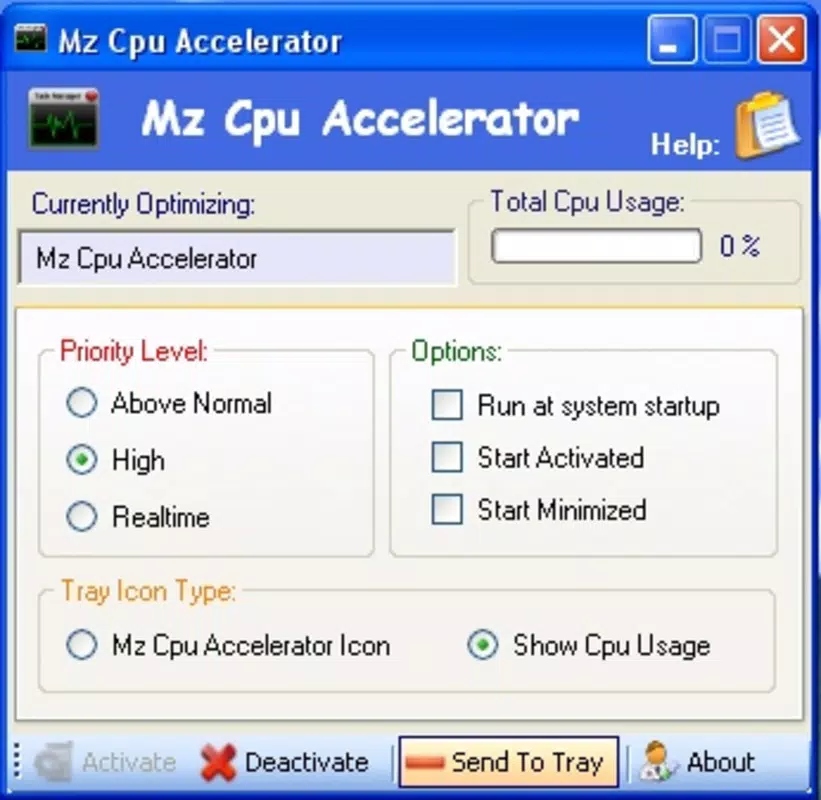
- User-Friendly Interface: The application features a minimalistic layout that allows users to access essential functions with a few clicks, reducing the learning curve for non-technical users.
For example, a user editing a video while having music streaming in the background can benefit from the app’s ability to shift CPU focus to the editing software, minimizing delays and stuttering. Similarly, gamers may experience smoother frame rates during gameplay when background processes are deprioritized.
Interface, UX & Performance
The interface of Mz Cpu Accelerator is designed with simplicity in mind, featuring a clean layout with minimal visual clutter. Navigation is straightforward, allowing users to initiate performance optimization with a single click. The absence of complex menus or configuration panels makes it accessible to users with limited technical experience.
Although the developer did not list formal performance metrics, the application’s lightweight footprint suggests it operates efficiently across a wide range of Windows devices. Its 1.3 MB size indicates minimal impact on system memory and storage, contributing to stable operation even on older hardware.
Responsiveness is maintained through real-time process monitoring, ensuring that CPU adjustments occur seamlessly. The tool does not appear to introduce noticeable delays or system instability, which is critical for a utility that modifies core system behavior. Users can expect consistent performance without unexpected crashes or resource spikes.
Stability appears to be a key strength, given the app’s long-standing presence since 2007. While specific compatibility details were not disclosed, its continued availability suggests reliability across multiple Windows versions.
Platform Compatibility & Technical Requirements
Mz Cpu Accelerator is designed for the Windows platform, making it compatible with a wide range of desktop and laptop systems running Windows operating systems. The application is available in version 1.0.0 and has a file size of 1.3 MB, indicating a compact and efficient footprint.
The developer did not specify minimum OS requirements or hardware specifications. As such, users should verify compatibility with their specific Windows version before installation. While the app has been in use since 2007, it may not be optimized for the latest Windows updates or newer processor architectures.
Users are advised to ensure their system meets general Windows compatibility standards before proceeding. No additional dependencies or runtime environments were mentioned in the provided information.
Pros and Cons
Pros
- Free to download and use with no hidden costs
- Lightweight design with minimal system impact
- Simple, intuitive interface suitable for non-technical users
- Real-time process prioritization enhances system responsiveness
- Long-standing presence in the utility space suggests stability
Cons
- Specific compatibility details were not provided by the developer
- No official update history or changelog available
- Performance improvements may vary depending on system configuration
- Limited customization options for advanced users
- Not available on mobile platforms such as Android or iOS
FAQ
Is Mz Cpu Accelerator safe to use?
Yes, the application is designed as a system utility that modifies process priorities without altering critical system files. However, users should always download it from trusted sources to ensure authenticity.
Can I use Mz Cpu Accelerator on older Windows systems?
The developer did not specify minimum OS requirements. While the app has been available since 2007, compatibility with modern Windows versions is not confirmed. Users should test on their system to verify functionality.
Does Mz Cpu Accelerator require an internet connection?
No, the tool operates offline and does not require an internet connection to function.
Is Mz Cpu Accelerator available for Android or iOS?
No, the application is exclusively designed for Windows and is not available on mobile platforms.
How often should I update Mz Cpu Accelerator?
The developer did not provide an update schedule or changelog. Users are advised to monitor official sources for any new releases or security patches.
Final Thoughts
Mz Cpu Accelerator stands out as a no-nonsense utility for users seeking to improve their Windows system’s performance with minimal effort. Its focus on process prioritization delivers tangible benefits in real-world scenarios, particularly for those running multiple applications or using older hardware. The free availability, lightweight design, and user-friendly interface make it a compelling choice for both beginners and experienced users.
While the lack of detailed compatibility information and update history may raise concerns for some, the app’s long-standing presence suggests a level of reliability. For users looking to optimize their PC without installing heavy software, Mz Cpu Accelerator offers a straightforward, secure, and effective solution.
Download Mz Cpu Accelerator now


